
iPhone Duo eSIM Guide: No SIM Slot, Setup and Travel
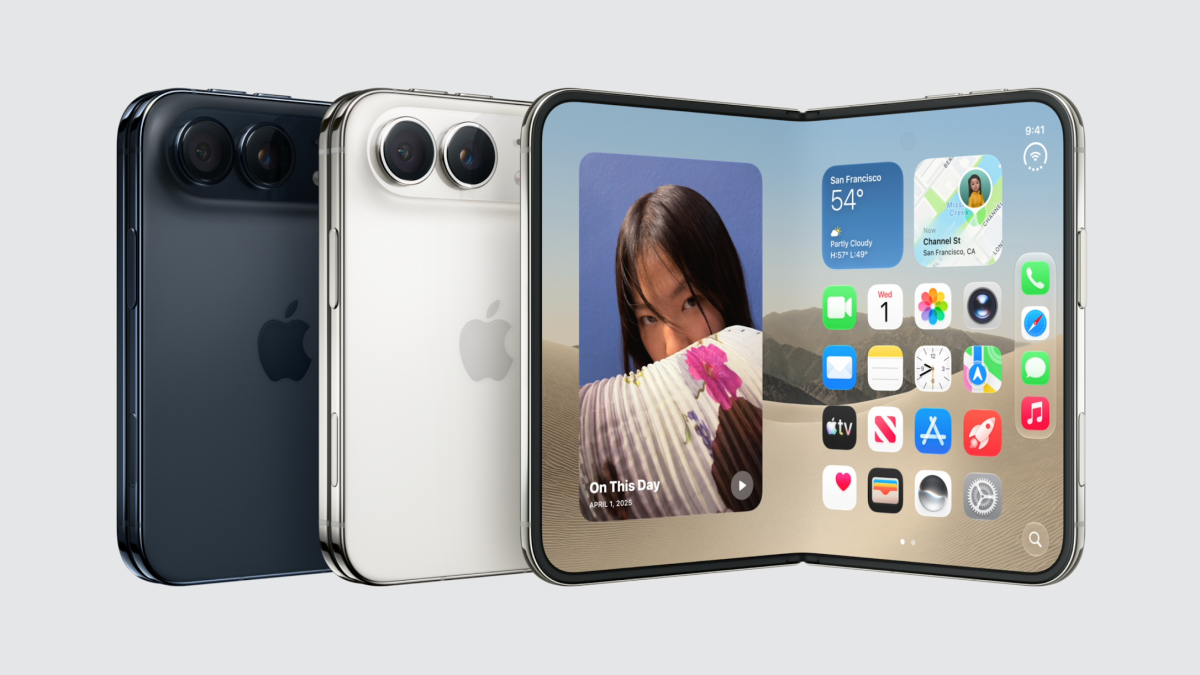
iPhone Duo is eSIM-only worldwide. Apple’s first foldable iPhone has no physical SIM tray, regardless of where it is sold. It can keep two eSIMs active at once and store eight or more eSIM profiles.
That makes one question especially important before buying it: can your regular mobile carrier move your number to eSIM? Once your home line is set up, you can add a separate travel eSIM for mobile data abroad. This guide covers both steps and explains how to avoid using the wrong line while traveling.
This guide is based on Apple’s announced specifications and support instructions as of September 2026. iPhone Duo is scheduled to become available in October 2026, so individual setup screens may differ when the device is released.
Does iPhone Duo Have a Physical SIM Card Slot?
No. According to Apple’s iPhone Duo specifications, the phone is not compatible with physical SIM cards. Apple describes it as eSIM-only worldwide.
This is different from some iPhone 18 Pro models sold outside the United States, which may still have a nano-SIM tray. Buying iPhone Duo in another country will not give you a version with a physical SIM slot.
If your current number is on a plastic SIM, you cannot simply move that card into iPhone Duo. Your mobile carrier must provide a way to activate your line digitally. Check this before buying the phone, particularly if you use a smaller carrier, a business account or a plan that has restrictions on eSIM activation.
A travel eSIM does not solve a problem with transferring your regular phone number. The two plans serve different purposes: your home carrier manages your existing number, while a travel eSIM can provide mobile data at your destination.
Can iPhone Duo Use Two eSIMs at the Same Time?
Yes. iPhone Duo supports two active eSIMs and can store eight or more eSIM profiles.
For example, you could use one active line for your regular number and another for travel data. You could also save eSIM profiles for different destinations and turn on the one you need for a particular trip. Storing a profile does not mean every stored plan remains active or valid indefinitely; each plan has its own terms.
Your iPhone uses one cellular data line at a time. Even with two eSIMs active, you choose which one provides internet access in Settings → Cellular → Cellular Data. The labels may appear as Mobile Data on phones configured for another region.
How Do You Move Your Existing Number to iPhone Duo?
Start with your home mobile carrier. Ask whether your current plan supports eSIM and how to transfer it from your old phone. There are several possible methods.
If Your Carrier Supports eSIM Quick Transfer
Apple’s eSIM Quick Transfer can move an eligible line from a nearby iPhone to the new one. With some carriers, it can also convert the physical SIM in your previous iPhone into an eSIM on iPhone Duo.
During setup, follow the prompt to transfer your cellular plan. You can also start afterward from Settings → Cellular → Add eSIM and choose a plan to transfer from a nearby iPhone. Keep both devices nearby, signed in to your Apple Account, with Bluetooth enabled, and follow the confirmation prompts.
When the plan activates on your new phone, the previous SIM is deactivated. Apple explains the carrier requirements and steps in its official eSIM setup guide.
If Quick Transfer Is Not Available
Your carrier may offer activation through a QR code, its app or another account process. Contact it before resetting or giving away your old phone, especially if you rely on your number for login codes.
Do not assume an existing travel eSIM can be transferred with Apple’s Quick Transfer. Travel providers have their own rules for moving an installed plan to a new device. Check those rules or contact the provider before deleting the eSIM from your previous phone.
Can You Use a Travel eSIM on iPhone Duo?
Yes, as long as iPhone Duo is unlocked for use with another provider and the travel plan covers your destination. Its two active eSIM slots let you keep your home line available while using a separate plan for mobile data.
Before purchasing a plan from another provider, check Settings → General → About → Carrier Lock. Apple says an unlocked iPhone displays “No SIM Restrictions.” A carrier-locked device may need to be unlocked by the carrier before it can use a different provider’s travel eSIM.
Then check the plan itself: the countries it covers, data allowance, validity period and installation instructions. If you are visiting several countries, verify the complete coverage list rather than assuming a regional plan includes every stop.
How Do You Install a Travel eSIM on iPhone Duo?
The process follows Apple’s regular iPhone eSIM setup. Your provider might supply a QR code, an installation link or an app.
- Connect iPhone Duo to reliable Wi-Fi or another internet connection.
- Open the installation instructions supplied with your travel plan.
- If you received a QR code on another screen or on paper, scan it with the iPhone Camera and follow the Cellular Plan Detected prompt.
- If the QR code is in an email or browser on your iPhone, touch and hold it and select Add eSIM if that option appears.
- Follow the onscreen prompts and label the new line Travel.
You can generally prepare the installation before departure, but check when your particular plan’s validity begins. Installation and the start of a plan’s usage period are not necessarily the same thing for every provider.
For travel planning, VIA eSIM’s destination plans let you choose coverage based on where you are going. Check the selected package’s details before purchasing. A data-only eSIM provides internet access; it does not automatically give you a new number for traditional calls and SMS.
Which eSIM Should Provide Data While You Travel?
After arriving, make sure iPhone Duo uses the travel eSIM for cellular data:
- Open Settings → Cellular or Mobile Data.
- Confirm that the travel eSIM is turned on.
- Open Cellular Data and select the travel line.
- Turn off Allow Cellular Data Switching if you do not want the phone to switch to your home line for data.
- Keep Data Roaming off on your home line.
- Turn Data Roaming on for the travel line if your plan requires it.
Many travel eSIMs need Data Roaming enabled because they connect through supported partner networks. The setting must be applied to the travel eSIM, while the home line’s settings should be reviewed separately. Our guide to data roaming with a travel eSIM walks through the distinction.
You can keep your regular line active for calls and verification messages, but your home carrier may still charge for certain calls or texts abroad. Turning off data roaming on that line does not automatically make all its other services free.
Does the Foldable Screen Change How eSIM Works?
No. The foldable display changes how you might use the phone during a trip, but it does not change the basic relationship between your eSIM plans. You still select one line for cellular data and manage each plan in Cellular settings.
The larger inner display may be useful when viewing an itinerary alongside a map or checking travel details. The outer display offers a quicker way to check directions or a ticket without opening the device. Both depend on the same mobile connection when Wi-Fi is unavailable.
A larger screen does not, by itself, mean you need a larger eSIM package. Data use depends mainly on what you do, such as video streaming, uploading photos, navigation and app updates. Choose your plan based on your trip and usage habits.
What Should You Check Before Buying iPhone Duo for Travel?
Because there is no physical SIM fallback, take a few minutes to confirm the parts of your setup that depend on other companies:
- Your home carrier: Can it activate your existing number as an eSIM on iPhone Duo?
- Your phone’s lock status: Will the device accept a plan from another provider?
- Your destination: Does your travel eSIM cover every country on the itinerary?
- Your calling needs: Do you need your home line active for calls or verification texts?
- Your installation timing: Can you install the travel plan before leaving, and when does its validity begin?
Apple announced iPhone Duo on September 9, 2026. Pre-orders are scheduled to begin on October 16, with availability beginning October 23 in the first group of markets and October 30 in additional markets. Check Apple’s announcement for launch details relevant to your country.
Frequently Asked Questions
Is iPhone Duo eSIM-only everywhere?
Yes. Apple states that iPhone Duo has an eSIM-only design worldwide and does not support physical SIM cards.
Can I put my current SIM card into iPhone Duo?
No. If your current number uses a physical SIM, ask your mobile carrier to move that line to an eSIM. Depending on the carrier, it may support Apple’s eSIM Quick Transfer, provide a QR code or use another activation method.
Can I keep my phone number while adding a travel eSIM?
Yes. Your regular number can remain on your home carrier’s eSIM while a second eSIM provides travel data. A data-only travel plan does not transfer or replace your existing number. See our guide on eSIMs and phone numbers for the difference.
How many eSIMs can iPhone Duo use?
Apple lists two active eSIMs and storage for eight or more eSIM profiles. Only the line you select for cellular data provides that connection at a given time.
Will a travel eSIM prevent all roaming charges?
It can provide an alternative mobile data connection, but it does not automatically prevent charges on an active home line. Select the travel eSIM for data, turn off home-line data roaming and check your carrier’s rates for calls and texts.
Do I need internet to set up an eSIM?
Plan to have Wi-Fi or a hotspot available when downloading and activating an eSIM. Apple notes that some eSIM-only iPhones can activate without Wi-Fi in certain countries or regions, but it is better to arrange a reliable connection before you need the travel plan.
The Takeaway
iPhone Duo’s biggest connectivity difference is straightforward: there is no physical SIM option anywhere. Confirm that your home carrier can move your number to eSIM before buying the device. Once your regular line works, you can add a separate travel eSIM, keep both lines active if needed and choose the travel line for mobile data abroad.
The phone’s folding screen may make maps and itineraries easier to use, but a dependable connection still comes down to the right coverage, an unlocked device and the correct line settings.